# Storylane App for HubSpot

### Prerequisites

1. **Install the App**\
   To get started, install [the **Storylane App for HubSpot** from the HubSpot App Marketplace](https://ecosystem.hubspot.com/marketplace/apps/storylane-385060).
2. **Integrate Storylane with HubSpot**\
   For the app to work seamlessly, you must [integrate Storylane with HubSpot](https://app.storylane.io/integrations) to enable API-level data sharing.

### **How it Works?** <a href="#how-it-works" id="how-it-works"></a>

Here is a quick interactive demo of how it works 👇

{% @storylane/embed subdomain="app" linkValue="4zf5t1dx4bjl" url="<https://app.storylane.io/share/4zf5t1dx4bjl>" %}

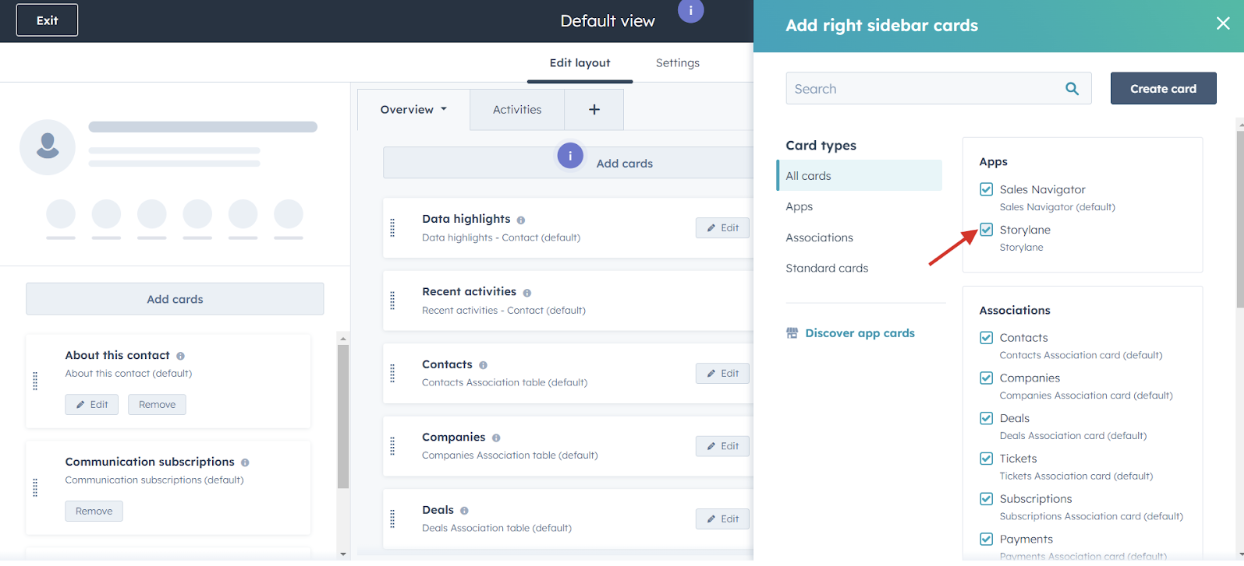
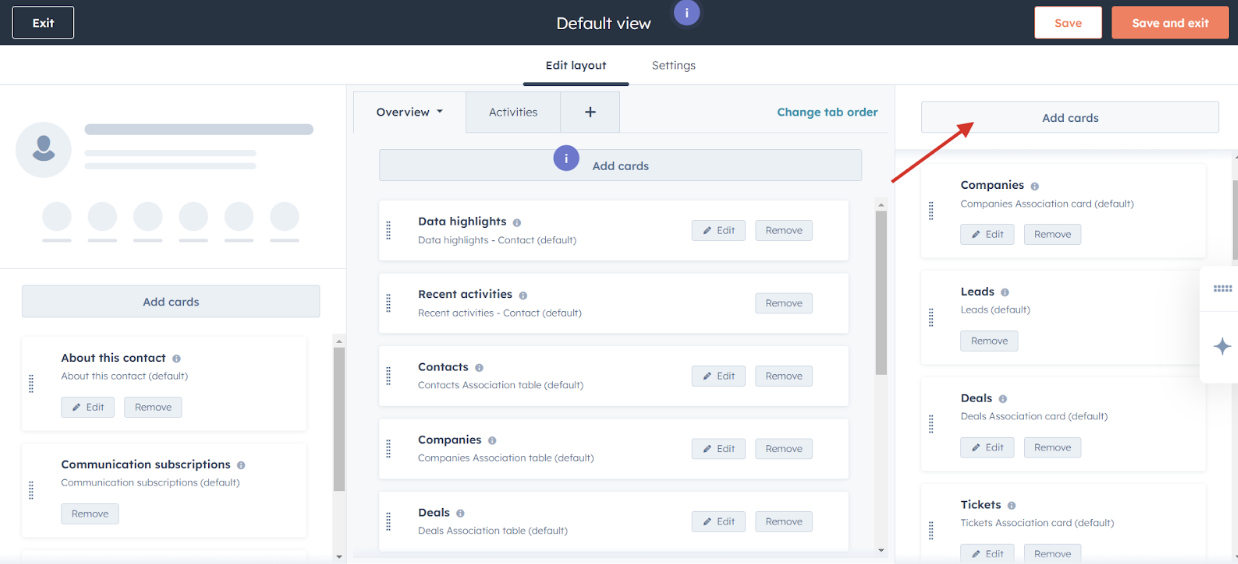
### Step 1: Add the Storylane Card to HubSpot's Contact Sidebar

1. Navigate to Contact Edit Layout in your HubSpot account.
2. Locate and add the Storylane card to the contact sidebar.
3. Click Save and Exit to apply your changes.

<div align="left"><figure><img src="https://2431356420-files.gitbook.io/~/files/v0/b/gitbook-x-prod.appspot.com/o/spaces%2FN8hWd9k2Pbb6YSWO4pUQ%2Fuploads%2FJnmaGcarMFlUWtEu9XQF%2FScreenshot%202024-12-27%20at%2016.29.42.png?alt=media&#x26;token=202b2cda-e7a7-4cf2-a220-363a8d98ee15" alt="" width="563"><figcaption></figcaption></figure></div>

<div align="left"><figure><img src="https://2431356420-files.gitbook.io/~/files/v0/b/gitbook-x-prod.appspot.com/o/spaces%2FN8hWd9k2Pbb6YSWO4pUQ%2Fuploads%2FoXknX4zcYewUuezqchOt%2FScreenshot%202024-12-27%20at%2016.29.58.png?alt=media&#x26;token=366a77d9-3ffe-4013-b5cf-23aaaf306f2d" alt="" width="563"><figcaption></figcaption></figure></div>

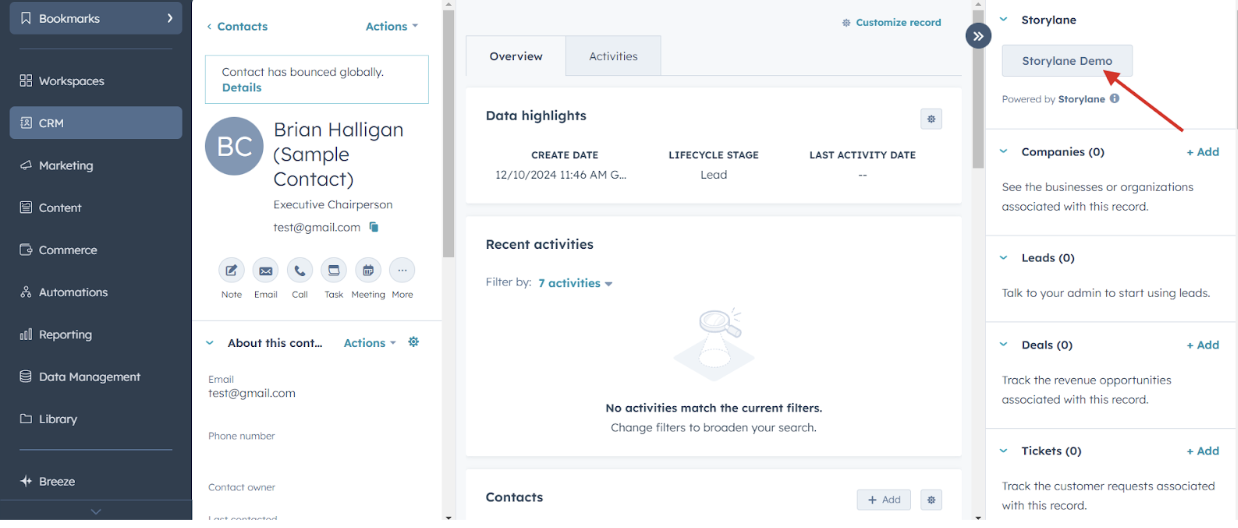
### Step 2: Access the Storylane Extension

1. Open a contact record in HubSpot.
2. Click the Storylane Demo button located in the sidebar.
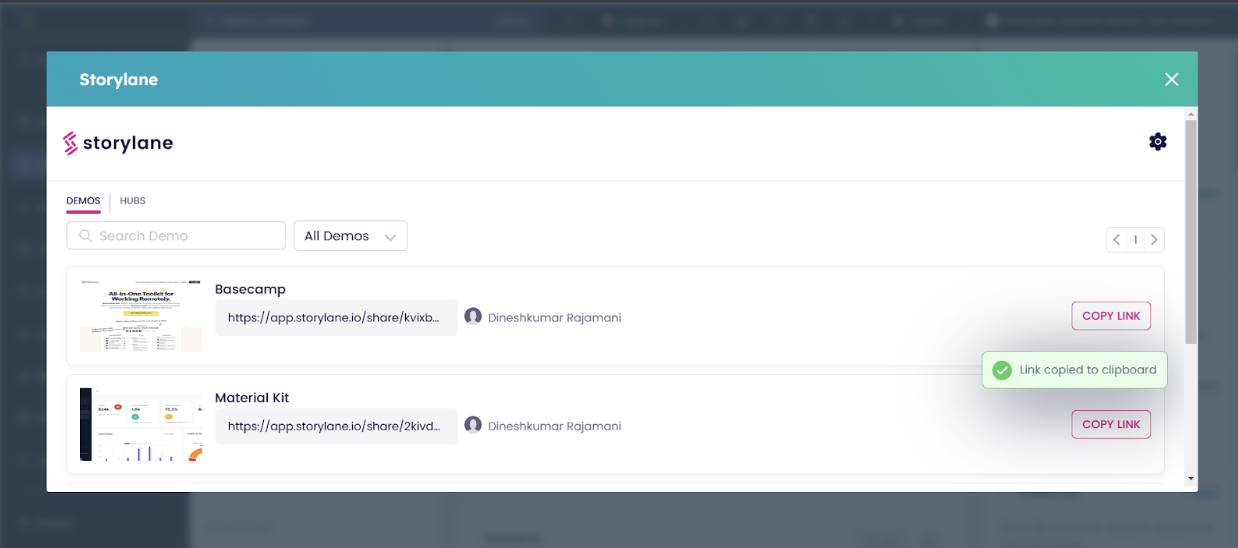
3. A modal iframe will open. Log in using your Storylane credentials.

<div align="left"><figure><img src="https://2431356420-files.gitbook.io/~/files/v0/b/gitbook-x-prod.appspot.com/o/spaces%2FN8hWd9k2Pbb6YSWO4pUQ%2Fuploads%2FSYlNALNztghi2oF6P14X%2FScreenshot%202024-12-27%20at%2016.31.21.png?alt=media&#x26;token=b2d572a3-456c-4da6-897e-8fa961983255" alt="" width="563"><figcaption></figcaption></figure></div>

### Step 3: Copy and Share Tokenized Demo Links

1. Once logged in, you’ll see a list of available demos.
2. Click Copy Link next to the desired demo to copy the tokenized URL to your clipboard.
   1. If the contact email exists, a tokenized URL will be copied.
   2. If the contact email is missing, the default demo URL will be copied instead.
<div align="left"><figure><img src="https://2431356420-files.gitbook.io/~/files/v0/b/gitbook-x-prod.appspot.com/o/spaces%2FN8hWd9k2Pbb6YSWO4pUQ%2Fuploads%2FW3C8voaoXhuncCIr14il%2FScreenshot%202024-12-27%20at%2016.32.15.png?alt=media&#x26;token=701ff5a3-6592-4a00-b2a0-26468ec27411" alt="" width="563"><figcaption></figcaption></figure></div>